


Most “best website builder” lists rank platforms on templates and drag-and-drop editors. That is the wrong test for a coach. Almost any builder can make a handsome homepage. What separates them is what happens after someone decides they want to work with you: can they book a call, pay for a package, get into your program, and hear from you again without you stitching it together by hand?
So start with what you sell. The platform follows from that.
What does a coaching website actually have to do?
Four jobs, and every platform handles them differently.
- Booking. A discovery call or a session, on your calendar, with reminders.
- Courses or memberships. A place to deliver a program, a recorded course, or ongoing access, if you sell anything beyond live time.
- Payments. Single sessions, packages, payment plans, or recurring billing.
- Email. The welcome sequence, the nurture, the “your session is tomorrow.”
Here is how the four platforms we recommend most often cover them.
| Booking | Courses and memberships | Payments | Best for | Skip it if | ||
|---|---|---|---|---|---|---|
| Kajabi | Built in | Built in | Built in | Built in | Coaches selling programs and courses | You only sell sessions and like your current tools |
| Squarespace | Via Acuity Scheduling | Built in, with a fee | Built in | Basic; add Kit | A credible site this week | You already need custom functionality |
| WordPress | Via plugins | Via plugins | Via plugins and Stripe | None; add Kit | A site built to grow for years | You want zero maintenance |
| Kit | No | Simple digital products only | Simple digital products only | Its whole job | The email layer beside the others | You need a website platform |
Kajabi: when you sell programs, not just sessions
Kajabi is the most complete all-in-one for selling what you know. Its real product is the absence of integration work. The site, checkout, email, courses and community live in one system that knows about itself, so the sequence that fires when someone buys just works.
For coaches specifically, Kajabi’s coaching product lists built-in session scheduling with automated confirmations and reminders, structured programs with milestones and resource attachments, one-time or recurring coaching payments, tiered packages, and automated email follow-ups tied to the program. That covers all four jobs without a second login.
What it costs, in ballpark terms (September 2026, subject to change):
| Tier | Roughly per month | What the tier caps |
|---|---|---|
| Entry (Basic) | $150 to $180 | A handful of products, a few thousand contacts, 1 website |
| Middle (Growth) | $200 to $250 | Dozens of products, tens of thousands of contacts |
| Top (Pro) | $400 to $500 | Unlimited products, around 100,000 contacts, multiple websites |
The lower figure in each range is for paying annually. Kajabi says it takes no revenue share as a platform. Card processing through Kajabi Payments runs around 3% plus a small fixed fee per transaction, and if you use a third-party processor instead, Kajabi adds its own small percentage on top, which shrinks on higher tiers. Contacts are a real limit here, and extra capacity costs extra.
We have built in Kajabi since the old platform and were hands-on through the move to New Kajabi. Brendon Burchard, one of our long-standing clients, was an early adopter. The honest trade: every edge is a little duller than the specialist tool. The email is not a dedicated email platform, the site builder is not a CMS, and the page builder has a ceiling. Migrating off later is real work.
Shortlist it if courses, programs or a membership are the center of the business, or about to be. Skip it if you sell one-to-one time and already have a site and email platform you like. You would be paying to replace things that already work.
Squarespace: a credible site this week
Squarespace makes a coaching practice look put-together without hiring anyone. The templates are tasteful, and hosting, domain and updates are handled. We are a Squarespace Gold Partner, and we have watched people with no technical background build a site over a weekend that they are still happy with.
What surprises people is how much sits around the website now:
- Booking runs through Acuity Scheduling, which comes from the same company and integrates properly. Acuity takes payments and deposits through Stripe, Square, PayPal or Venmo, lists Zoom and Google Meet integrations, sends reminder emails, and handles intake forms. As of September 2026 its entry plan ran roughly $15 to $20 a month. Selling session packages, memberships or payment plans starts on the next tier up, at roughly $25 to $35 a month.
- Courses and memberships are available on every Squarespace website plan, with a transaction fee on those sales.
- Payments run through Squarespace Payments, Stripe or PayPal, and invoices are free on all plans.
What it costs, in ballpark terms (September 2026, subject to change):
| Plan | Roughly per month | Fee on courses and memberships (at the time) |
|---|---|---|
| Basic | $20 to $25 | 7% |
| Core | $30 to $40 | 5% |
| Plus | $50 to $65 | 1% |
| Advanced | $100 to $140 | 0% |
The lower figure in each range is for paying annually. Card processing runs around 3% plus a small fixed fee per transaction, a little lower on the top plans. Read that fee column before you launch a course. On Basic, 7% of every course sale went to Squarespace before card processing. The plan that looks cheapest stops being cheapest once course revenue is steady, so run the numbers at the revenue you expect, not the revenue you have.
The one weak spot is email. Squarespace’s native email automation is basic to the point of frustration, and we have raised it with them directly. If email is part of how you sell, and for coaches it usually is, run a real email platform alongside it.
Shortlist it if you are on your way to your first six figures and need a credible site, a booking link and a way to get paid. That is a real recommendation, not a consolation prize. Skip it if you can already name a specific thing you need that the templates cannot do. Starting here usually means paying to rebuild later.
WordPress: when the site is the long-term asset
WordPress is open-source software, licensed under the GPLv2, and WordPress.org says it runs over 43% of sites on the web. It stays there because there is almost no ceiling: if you can describe the functionality, it can be built with a plugin, a theme or custom code, and the site belongs to you rather than to a builder that owns the walls.
It is the platform we have built on longest, and the one we have put thought leaders on when they wanted a website with a real system behind it. Two examples from our own work:
- For Jimmy Farris, a keynote speaker and executive coach, we built a custom WordPress site designed around his speaking and coaching offers, with opt-ins wired to Kit and automated inquiry workflows that route leads to the right follow-up.
- For Sonia Choquette, we originally built her marketing, membership and ecommerce platform on WordPress, with WooCommerce, LearnDash and MemberPress among the tools. She has since moved to a new Webflow site, which we manage.
Payments on WordPress usually run through a plugin with Stripe underneath. Stripe charges roughly 3% plus a small fixed fee per domestic card transaction, with no setup or monthly fees.
The software is free. Running it is not, and that is the part people misread. You own the hosting, updates, security and the occasional plugin conflict, which is why good managed hosting such as Cloudways or WP Engine is a companion decision, not an afterthought. Plugin sprawl is the other tax, and the most common reason a WordPress site feels slow. We wrote that up in how to optimize your website for speed.
One distinction that costs people money: WordPress.org is the free, self-hosted software. WordPress.com is a hosted commercial service built around it, with its own plans and limits. Know which one you are comparing.
Shortlist it if your site needs to do something specific, grow for years and be yours at the end, and you have technical help or will pay for it. Skip it if you want to point and click a site up this weekend and never see the machinery.
Kit: the email layer, not the website
Kit is on this list because two of the three platforms above need a partner for email, and Kit is the one we point most coaches toward. It is creator-first: a subscriber is a person with tags, not a row trapped in a list, and the interface is calm enough to send something today.
It hosts landing pages and can sell straightforward digital products, which is a good way to test whether people will pay before investing in a bigger platform. It is not trying to be Kajabi. Course delivery with drip and access rules is a different tool’s job.
Pair it with Squarespace or WordPress. Skip it if you are on Kajabi and happy with its built-in email, or if you need sales pipelines and lead scoring, which is CRM work.
Honest alternatives we earn nothing from
- Calendly is the common booking alternative to Acuity. As of September 2026 its free plan covered one event type, and paid plans started at around $10 per seat per month, with Stripe and PayPal payments at booking.
- Webflow is for design-led businesses with budget for professionals. It is marketed next to the DIY builders but is closer to a professional design tool. Without that skill, you will get less than Squarespace gives you.
- Wix is the easiest on-ramp and the one we would steer most people away from. It competes at the same price as builders we like considerably more.
A word on money: Kajabi and Kit are affiliate links on our toolkit pages, and we say so there. Squarespace, WordPress, Webflow, Wix and Calendly are not.
How to choose in five minutes
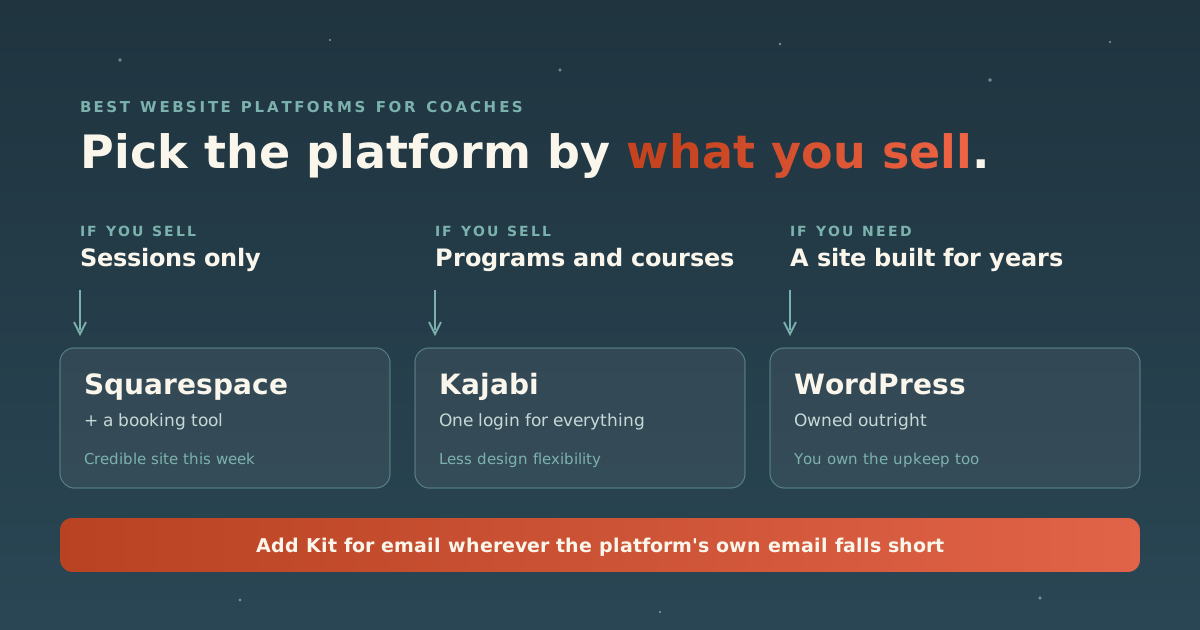
- Write down what you sell. Sessions only, or sessions plus a program, course or membership.
- Sessions only, and you want to be live soon: Squarespace plus Acuity, plus Kit for email.
- Programs, courses or a membership at the center: Kajabi, and accept the flexibility trade knowingly.
- A site that has to do something unusual, carry a lot of content, or last for years: WordPress, with managed hosting and someone to maintain it, plus Kit for email.
- Price the two-year version. Contacts on Kajabi, the course fee on Squarespace, hosting and maintenance on WordPress. Those are what the bill grows on.
Two more things are worth saying plainly. Running two systems, say a custom site for the brand with Kajabi behind it for courses and checkout, is legitimate and common. It also means two platforms to pay for, maintain and keep looking alike, indefinitely. And the platform is rarely what holds a coaching site back. A clear offer and an obvious next step matter more than which builder drew the page. Our Website Analyzer will tell you where your current site stands before you decide to move it anywhere, and the lean stack covers how we think about the layers underneath.
If you want it built rather than chosen, that is our web design work, and the full toolkit has the longer review of every tool named here.
Sources: Kajabi pricing · Kajabi coaching · Squarespace pricing · Acuity Scheduling pricing · Calendly pricing · About WordPress · Stripe pricing
Prices here are ballparks from the vendors’ own pages as of September 2026, after this article’s original date. They are subject to change, so treat them as a sense of low, middle and high, and confirm current figures with the vendor before you buy.