


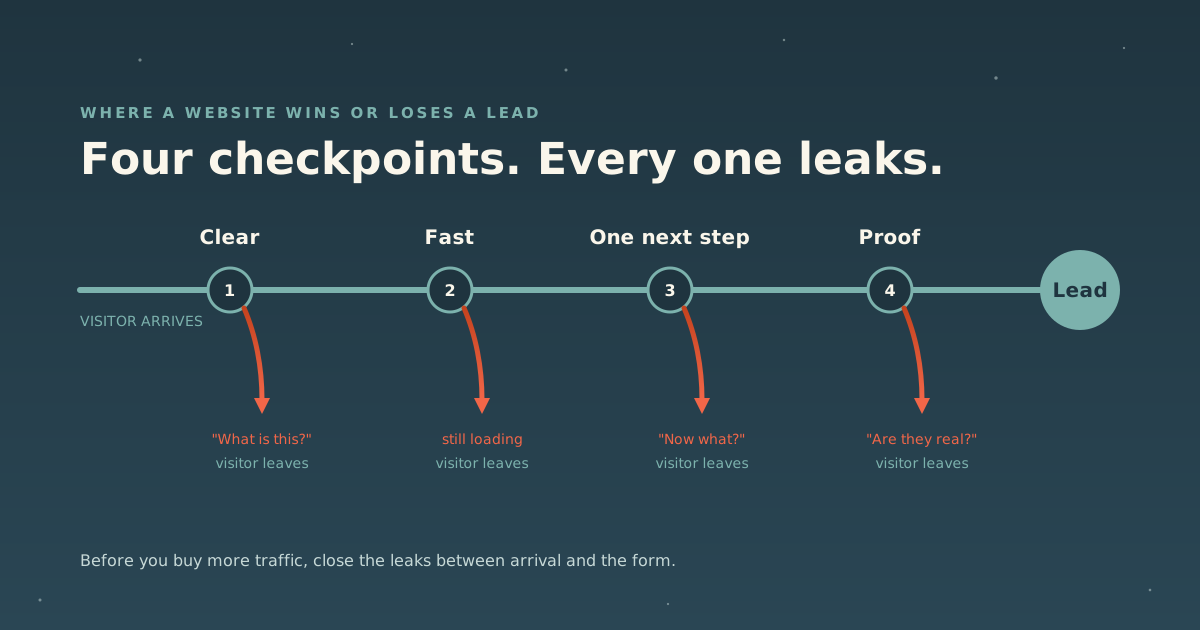
When a website isn’t producing leads, the reflex is to get more traffic: more ads, more posts, more SEO. Sometimes that’s the right call. But if the site is leaking, more traffic just means more people leaking out of it, and now you’re paying for each one.
Most sites leak at the same four points. A visitor arrives and asks, in order: What is this? Is it loading? What do I do now? Are these people for real? Fail any one of those and the visit ends without a lead. This piece covers each checkpoint, what fixing it looks like, and where we go deeper on it.
First, find out where you’re leaking
Before you change anything, get two numbers for your main pages: visits and leads. That means your contact form, booking link or opt-in has to be tracked as a conversion. In Google Analytics 4 that’s done by marking the event as a key event, which Google describes as a measure of the actions that are important to your business.
Then look page by page, not site-wide. A page with plenty of visits and no leads is a specific, fixable problem. A site-wide average is just a mood. If people are leaving almost as soon as they arrive, our piece on bounce rate explains how GA4 now measures that and what a high number actually means.
For an outside read, our free Website Analyzer grades a page in about thirty seconds, with no account required, across six dimensions. One of them is conversion: how clearly each page moves a visitor to the next step. It ends with the top three things to fix first. Run Google PageSpeed Insights alongside it for the speed side.
Checkpoint 1: can a stranger tell what you do in ten seconds?
The research we lean on here is old but still useful. In 2011, Nielsen Norman Group analyzed Microsoft Research data covering more than two billion page-visit durations and concluded that users often leave pages within 10 to 20 seconds, that the first 10 seconds are critical to the decision to stay, and that to hold attention longer you must communicate your value proposition within those 10 seconds.
In practice, the top of your homepage and every landing page should answer three questions without scrolling:
- What do you do? In plain words. “Transformational solutions for growth” says nothing. “Bookkeeping for independent restaurants” says everything.
- Who is it for? Visitors should be able to recognize themselves.
- What happens next? The action you want them to take, visible on arrival.
Clever headlines lose to clear ones here. Read yours as a stranger would. If you need the second paragraph to understand the first, rewrite the first.
Clarity also applies past the homepage. In our experience the about page is often one of the most visited pages on a site, and it’s where people go to decide whether to trust you. We wrote up the five things most about pages are missing, and a clear path to your services is one of them.
Checkpoint 2: does the page actually show up?
A page that is still loading can’t make a case. Google’s Core Web Vitals set the bar: main content visible (Largest Contentful Paint) within 2.5 seconds, a response to taps and clicks (Interaction to Next Paint) within 200 milliseconds, and layout shift (CLS) of 0.1 or less, measured at the 75th percentile of real visits.
The clearest evidence that speed affects leads specifically comes from a Vodafone case study published on web.dev in 2021. Vodafone split paid traffic 50/50 between two landing pages that were visually and functionally identical; the only difference was that one had been optimized for load performance. The optimized page had 31% better LCP and produced:
| Metric | Change |
|---|---|
| Lead-to-visit rate | +15% |
| Cart-to-visit rate | +11% |
| Total sales | +8% |
That’s one company and one landing page, so treat it as a demonstration, not a forecast for your site. But it’s a controlled test with nothing else changed, which is rarer than it should be.
Speed also matters to search. Google’s own page experience documentation says Core Web Vitals are used by its ranking systems, while cautioning that good scores don’t guarantee top rankings.
Two practical notes. First, when you test, know which numbers you’re reading. PageSpeed Insights shows lab data (a simulated load, useful for debugging) and, where Google has enough of it, field data from real Chrome users over the previous 28 days. Field data is what your visitors actually experienced. Second, the fix is usually not the images. On our own site, the main content took 12.7 seconds to appear on a phone, and the biggest culprit was marketing scripts holding the browser hostage. We got it to 2.1 seconds, and wrote up everything we changed, including the fix that made it worse. The general method is in how to optimize your website for speed.
Checkpoint 3: is there one obvious next step?
Visitors who understand you and can see the page now need to know what to do. The most common failure here isn’t a missing call to action. It’s four of them, all equally loud: book a call, download the guide, follow us, read the blog. Each extra option is another decision, and the easiest decision is to leave.
What works:
- One primary action per page. Pick the one that matters most on that page and make it the loudest thing on screen. Secondary links can exist; they should look secondary.
- Repeat it where the decision happens. After the opening, after the proof, at the end. A long page with a single button at the top asks people to scroll back up to act.
- End every page somewhere. A page that ends cold (no next step, no related reading) asks the visitor to invent their own next move. Most won’t.
- Shorten the form. Nielsen Norman Group’s form guidelines (2016) put “keep it short” first: remove any field whose information can be derived some other way, collected more conveniently later, or simply skipped. A first conversation rarely needs a phone number, company size and budget range.
- Test the path yourself, on a phone. Tap the button, fill the form, open the booking link from a cold browser. Broken embeds and dead booking links quietly cost more leads than weak copy.
This is not a settled question even for us. When we graded our own rebuilt site, one of the analyzer’s remaining notes was whether the hero should carry one call to action or two. The answer depends on the page, which is why it’s worth deciding on purpose.
Checkpoint 4: is there proof where the decision happens?
The last question a visitor asks before handing over an email address is whether you’re real and whether this has worked for people like them. Nielsen Norman Group’s research on trustworthiness (2016, building on Jakob Nielsen’s 1999 framework) found the same four factors still shape that judgment: design quality, up-front disclosure, comprehensive and current content, and connection to the rest of the web. One participant in their study ruled out a cleaning company within 35 seconds because it didn’t state its rates and wanted her to write in instead.
Turned into a checklist:
- Put proof next to the ask, not on a separate testimonials page nobody visits. A short quote or result beside the form does more than a wall of them elsewhere.
- Prefer specific over glowing. A named person describing what changed beats five stars and “great to work with!”
- Use video where you can get it. Written testimonials are easy to doubt. Tools like Testimonial.to make the ask a link clients answer from their phone, which removes most of the friction.
- Show real work. Case studies with the actual problem, the actual fix and the actual result. (Ours are in the portfolio.)
- Disclose up front. Who you are, where you are, how to reach you, and, if you can, what it roughly costs.
- Keep it current. Stale copyright years, dead social links and a blog that stopped in 2021 all read as “is anyone here?”
Give people who aren’t ready a reason to raise their hand
Most visitors on any given day are not ready to book a call. If “book a call” is the only option, they leave, and you never hear from them again. The fix is a smaller first step that’s still useful to them: an assessment, a short guide, a template, a recorded workshop.
Diagnostics work especially well, because the result leads naturally into your offer. For one client, Exit Strategy Coach, we built a free scorecard that rates a business’s exit readiness out of 60 and returns a report with the three highest-priority areas to improve. The booking invitation appears right where the reader has just seen their gaps, so the next step reads as help rather than a pitch. Seven days after it went live, he had signed two high-end coaching clients. That’s one engagement, and it’s the shape of what we build as AI-powered lead generation: tools that answer questions and qualify visitors before they reach your calendar.
Catch every lead, and answer fast
The last leak happens after the form. A lead that sits in an unmonitored inbox for three days is barely a lead. At minimum:
- Every lead lands in one place. A CRM, or a spreadsheet to start. Not your inbox.
- Every lead gets an immediate, useful reply, even if it’s automated: what happens next and when.
- People who opted in get a short follow-up sequence that delivers value and ends with a clear invitation.
Assembled, that’s a sales funnel: the pages, emails and follow-up that move someone from first visit to first conversation. If you work in a practice built on relationships, we covered the channel side of this in how to get more coaching clients.
A thirty-minute lead audit
| Checkpoint | Test | Fix if it fails |
|---|---|---|
| Clarity | Show your homepage to someone outside your industry for ten seconds. Can they say what you do and for whom? | Rewrite the headline in plain words |
| Speed | Run PageSpeed Insights on mobile. Is LCP over 2.5s? | Measure the cause, then fix it |
| Next step | Count equally prominent actions above the fold | Pick one; demote the rest |
| Form | Count the fields | Cut anything you can ask later |
| Proof | Is there a testimonial or result within sight of the form? | Move one there |
| Follow-up | Submit your own form. How long until you get a reply? | Automate the first response |
What to skip
- Buying traffic before the page converts. Ads multiply whatever the page already does, including leaking.
- Pop-ups on arrival. Asking for an email before the visitor knows who you are skips checkpoints one and four.
- Redesigning everything at once. Change one thing, measure, keep what works. If you change six things and leads go up, you won’t know which one did it.
- Chasing a benchmark conversion rate. The widely shared figures rarely trace to a source you can check. Your own before-and-after is the benchmark that matters.
The short version
A website becomes a lead engine when it passes four checks in order: a stranger understands it in ten seconds, it shows up fast on a phone, it asks for one clear thing, and it proves you’re real right where it asks. Add a smaller first step for people who aren’t ready and a reply that arrives fast, and most sites get more out of the traffic they already have.
If you’d like help with the part after the fix list, that’s what our sales funnel work is for. And if you want to know which checkpoint is costing you most, start with the free analyzer.
Sources: Nielsen Norman Group, How Long Do Users Stay on Web Pages? (Jakob Nielsen, 2011); web.dev, Web Vitals; web.dev, Vodafone: A 31% improvement in LCP increased sales by 8% (2021); Google Search Central, Understanding Google Page Experience; Google for Developers, About PageSpeed Insights; Google Analytics Help, Mark events as key events; Nielsen Norman Group, Website Forms Usability: Top 10 Recommendations (Kathryn Whitenton, 2016); Nielsen Norman Group, Trustworthiness in Web Design: 4 Credibility Factors (Aurora Harley, 2016). All sources as of September 2026.