


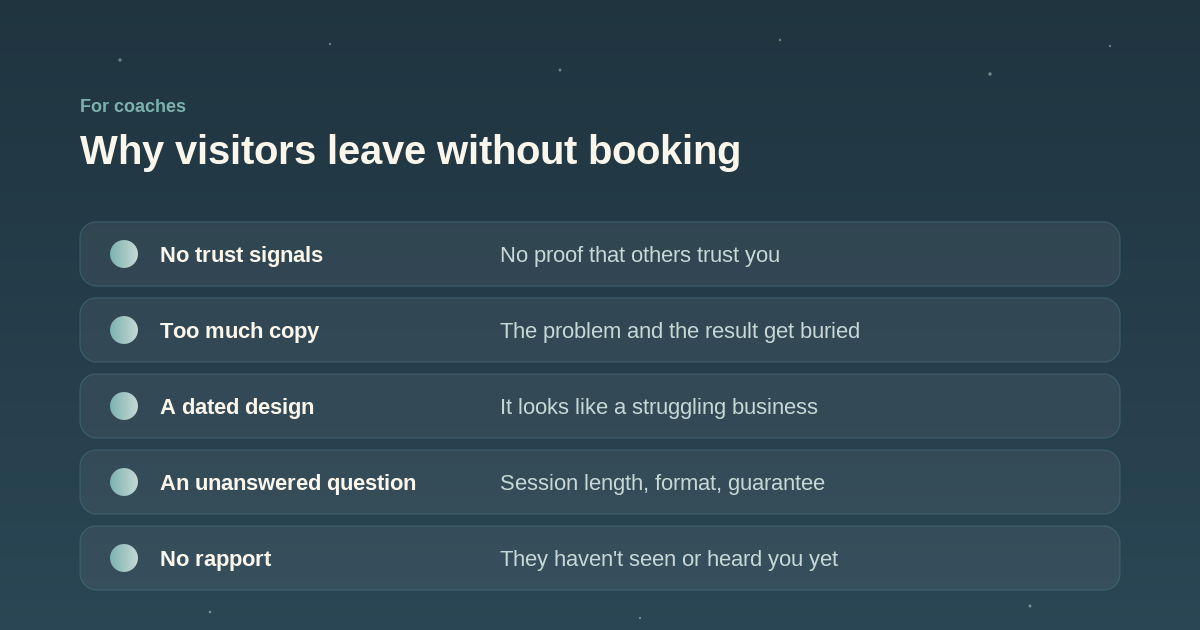
If people are reaching your coaching website and your calendar is still quiet, the traffic isn’t the problem. Something on the site is stopping them.
We asked Jason Miller, who founded Peaceful Media in 2008 and has led hundreds of client projects since, for the reasons he sees most. He starts with one simple check, then looks for five common causes, each with a way to check for it and a fix.
First, test the whole thing yourself
Before looking for deeper causes, rule out the simple one.
The first thing I do is test the entire site with my best first-time-visitor hat on. Does every button click? Does every form submit? Do the notifications go out? Occam’s razor often applies here: the simplest problem is the problem, and sometimes the fix is a single button.
Jason Miller, founder of Peaceful Media
If everything works, watch someone who has never seen the site go through it.
Have someone who knows nothing about you go through the site while you watch, and ask them to talk out loud: what’s unclear, what they don’t understand they’re getting. Strangers who visit your site never get the chance to tell you those things. A handful of people doing this will tell you, and your assumptions about how clear and easy everything is can go out the door pretty quickly.
Jason Miller
Paid user-testing and conversion services can do this at scale, but a few people at a table with your site will usually show you the biggest problems.
Not enough trust signals
People don’t want to be your guinea pig client. They need to see that others have had excellent experiences. Think about how you shop for a vacuum cleaner on Amazon. You look at the price, but you also scan the ratings, and one or two glowing reviews at the top make you far more willing to buy. It’s the same when you pick a restaurant from Google reviews. Yet the website, which is where the decision gets made, often has almost nothing to show that others trust you.
Jason Miller, founder of Peaceful Media
Trust signals include testimonials, endorsements, awards, media appearances, and the logos of companies and organizations you’ve worked with. On our own homepage, client logos sit near the top for exactly this reason.
We don’t want people scanning the rest of the site with a question in the back of their mind: why should I trust you? We want to show, loud and clear, that many people already have.
Jason Miller
Check: count the testimonials with a full name, a role and a specific result, and look at how far a visitor has to scroll to find the first one.
Fix: put two or three specific testimonials and any recognizable logos near every booking link, not on a separate page.
Too much copy, or the wrong copy
Many coaches either say too little about the visitor’s problem or bury it under everything else they want to say. Visitors are short on attention, and they’re looking for two things.
Do you understand the problem I’m experiencing? And does the value on the other side of working with you match the investment? The page has to describe the problem so well that people nod and think, this person gets me. Then it has to show what life looks like on the other side. Everything else is mostly fluff, and if those two things are hard to find within about ten seconds, people get tired and leave.
Jason Miller
Check: show your homepage to someone who fits your audience for ten seconds, then ask what problem you solve and what changes afterwards.
Fix: a short list of the problems your clients describe, in their words, followed by the outcomes of working with you. Move the rest to secondary pages or cut it.
A short assessment can do the same job in a more personal way. Exit Strategy Coach’s scorecard ends by showing each business owner the three areas costing them the most value at sale, then introduces the coach. Michael Morrissey signed two high-end clients within seven days of it going live.
A dated or awkward design
Before anyone reads a word, they’ve already judged the site.
When one person pulls up to a hotel in a dented old car and another in a clean Lexus, you make a snap judgment about each of them, whether it’s fair or not. People do the same with your website. Think of it as your salesperson, or the front desk of your business. It has to make each visitor feel welcome, seen and safe.
Jason Miller
Check: compare your site with the sites of two or three coaches your clients might also be considering, on your phone, and time how long each takes to load.
Fix: a clean, current design with clear navigation and a fast mobile experience. It doesn’t need to be elaborate. It needs to look like a business that’s doing well. Our free Website Analyzer checks speed and conversion for you.
One unanswered question
Many people are one answer away from booking. How long is the session? What do I need to prepare? What will I get afterwards? Is it on Zoom, Google Meet, the phone or in person? Is there a money-back guarantee? You’d be surprised how often one missing detail is what stops someone.
Jason Miller
Check: list the questions new clients ask on their first call. Any that your site doesn’t answer are likely stopping other people from booking.
Fix: answer them in a short FAQ next to the booking link. If visitors ask lots of different questions, a chat on the site can answer them, run by your team or by an AI assistant trained on your own material. More people are comfortable with that than a few years ago. Pew Research found in February 2026 that 49% of US adults use AI chatbots, up from 33% in 2024.
No rapport with you
At the end of the day, people are buying you as much as the benefits on the page. In our experience there’s no better way to build that trust than a professionally made video of you. Before someone reaches your booking page, have they had a few chances to get a feel for you, as a person looking them in the eye rather than words on a page? Even when you’re not trying to sell, your videos on YouTube, LinkedIn, Instagram or TikTok are quietly selling for you all the time. People want to buy from people they know.
Jason Miller
Check: is there a video of you on your homepage or booking page? How many videos could a prospect watch before deciding?
Fix: a short, well-made video of you on the booking page, and a steady stream of video on one or two channels. For Jimmy Farris, we produced a speaker reel and an 18-month email sequence that keeps his stories in front of subscribers every week, so people who weren’t ready yet still know him when they are.
Where to start
Test every button and form first, then watch a stranger use the site. After that, fix the causes in this order: trust signals, then the copy, then any questions your site doesn’t answer. Those three are mostly a matter of adding and rewriting content, so they can be done this week. Design and video take longer, and they’re worth it.
If you’d rather have it built, our Authority Site covers the positioning and copy, pages built around proof, a lead magnet such as an assessment with its sign-up page and welcome emails, and a page written to answer the question your buyers most often ask AI. It starts at $14,900 with copywriting included. Lyfe Marketing puts agency-built small-business websites at $5,000 to $30,000, so it sits in the lower half of that range. Prices are as of November 2026. For more ways to fill your calendar, read how to get more coaching clients.