


Every platform you build an audience on can change the terms. Reach gets throttled, feeds get reordered, accounts get suspended by an automated system with no appeal worth the name. The email list is the exception: a plain text file of people who said yes, portable between providers, worth roughly the same tomorrow as today.
Which is why “grow the list” sits on almost every marketing plan we see, and why it so rarely gets done. Not because it’s hard, but because it’s two jobs and most people only do the first: adding subscribers, while quietly losing them out the back at a rate nobody measures.
Here’s the version that works.
Growth is a rate, not a number
Before any tactic, get the arithmetic straight:
New subscribers − departures = net growth
Departures are not only unsubscribes. They’re bounced addresses, people who changed jobs, spam complaints, and the larger silent category: subscribers who still technically exist but haven’t opened anything in a year. That last group is worse than useless, and we’ll come back to why.
A widely-quoted figure says lists decay by 22.5% a year. We’re leaving it out, because tracing it leads to a decade-old citation of a citation, not a study anyone can read. Your own number is more useful anyway, and your platform already has it: export the last six months, count what you added and what you lost, and you have a real churn rate to plan against.
A list adding 200 a month and losing 180 is standing still. Knowing that changes what you work on. Sometimes the highest-leverage move isn’t a new capture form at all; it’s fixing why people leave.
Where subscribers actually come from
There are fewer sources than the internet implies, and they behave differently:
| Source | Volume | Quality | What it costs you |
|---|---|---|---|
| Your best-performing pages | Steady, compounds | High (they came for the topic) | One-time setup |
| A lead magnet with real utility | Medium to high | High if it’s specific | Real work to make |
| Live formats (talks, workshops, webinars) | Bursty | Highest | Prep, then it repeats |
| Other people’s audiences | Bursty | Medium to high | Pitching, relationship |
| Paid traffic to an opt-in page | Whatever you buy | Varies wildly | Money, immediately |
The first row is the one people skip. If you’ve been publishing for a while, some pages already earn attention you’re doing nothing with. Find your top ten pages by traffic, and put the offer on those ten, not on a new landing page nobody visits yet. Your about page is almost always in that ten, and it’s almost always the page with no next step on it.
Live formats produce the best subscribers by a distance, because the person has already spent an hour with you before they hand over an address. Our own webinars exist partly for this reason. The same logic runs the other way through other people’s audiences: guest teaching, podcast appearances, a partner’s newsletter.
Paid traffic is last on purpose. It multiplies whatever already converts; if nothing converts yet, it buys you a faster and more expensive way to find that out.
The signup form settings that measurably change the number
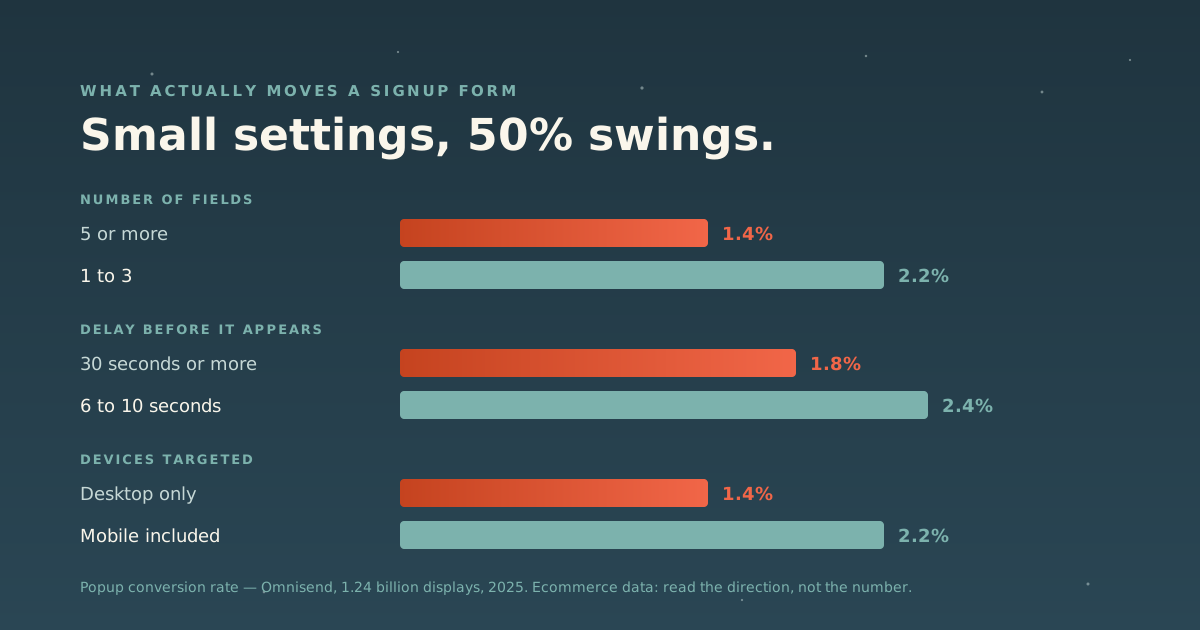
This is where guesswork usually takes over, so it’s worth looking at data. Omnisend analyzed 1.24 billion popup displays across the 2025 calendar year, excluding test forms and forms with fewer than 1,000 annual views. The average popup converted at 2.1%, down from 2.3% the year before.
What moved it:
| Setting | Worse | Better |
|---|---|---|
| Number of fields | 5+ → 1.4% | 1–3 → 2.1–2.2% |
| Delay before it appears | 30s+ → 1.8% | 6–10s → 2.4% |
| Immediate appearance | 0–1s → 1.9% | n/a |
| Devices targeted | Desktop only → 1.4% | Mobile included → 2.2% |
Three honest caveats. This is ecommerce data, so the absolute percentages won’t transfer to a coaching or consulting site. Treat the direction as the finding, not the number. Second, it’s vendor data about the vendor’s own product: a reason to read it carefully, not to dismiss it. The methodology is at least published. Third, the strongest single result in the set was gamified “spin to win” forms at 3.5%, which we don’t recommend, because a discount wheel on a consultant’s website buys subscribers who came for the wheel.
The transferable lessons are dull and reliable: ask for less, wait until they’ve started reading, and don’t exclude phones. A form asking for name, email, company, role and phone number is not gathering intelligence. It’s filtering out most of the people who would have said yes.
If a popup feels wrong for your site, it probably is. An inline form at the end of an article, on the about page, and in the site footer does most of the work without the interruption. Popups are one option, not the strategy.
What’s worth an email address?
The specificity test: can the person picture using it this week?
“Join my newsletter” cannot be pictured. “The 12 questions I ask on every discovery call” can. So can a template, a checklist, a worked example, a short email course, or a recording of a workshop you ran. The form matters less than whether it names a real problem.
One constraint people miss: the offer determines the list. A lead magnet about Instagram growth builds a list of people who want Instagram growth, and if your business is executive coaching, you now own an audience you can’t serve and shouldn’t email. Pick the magnet that sits directly upstream of what you sell.
(We’re going deeper on this in a companion piece on lead magnet formats; this section is the short version.)
Send something the moment they subscribe
The gap between “subscribed” and “heard from you” is where lists rot. Someone who gave you an address on Tuesday and hears nothing until the next newsletter in three weeks has forgotten who you are, which is exactly how a legitimate sender collects a spam complaint.
Automated mail outperforms broadcast by a wide margin. In the same Omnisend dataset (20 billion campaign emails and 470 million automated sends across 27,000+ brands in 2025), automated messages generated $3.41 per email sent against $0.155 for campaigns, and converted at 1.49% against 0.08%. Automated welcome emails saw a 35.53% open rate and a 3.94% click rate.
Again: ecommerce data, so the dollar figures are not yours. The pattern is what transfers, and it’s a strong one. Mail that arrives because of something the person just did beats mail that arrives because it’s Thursday.
The minimum viable version is three messages: deliver what you promised immediately, follow up two days later with the single most useful thing you’ve written on the topic, and a few days after that, say plainly what you do and who it’s for. That’s it. You can build the elaborate version later.
The elaborate version can run for a long time. For keynote speaker and executive coach Jimmy Farris, we built an 18-month automated nurture sequence: every new subscriber gets a weekly email of his stories, frameworks and motivation, starting the day they join. It keeps him in front of future buyers for well over a year without anyone writing a weekly broadcast. If you want help designing what happens after the welcome, that’s the workflow automation work.
The rules are now part of the growth plan
This used to be a compliance footnote. It isn’t anymore, because the mailbox providers started enforcing.
Gmail’s bulk sender requirements. Google defines a bulk sender as anyone sending close to 5,000 messages or more to personal Gmail accounts in 24 hours. Those senders must authenticate with SPF and DKIM, publish a DMARC record, keep the From: domain aligned with SPF or DKIM, and support one-click unsubscribe (RFC 8058) on marketing mail. On complaints, Google’s guidance is to keep the spam rate below 0.1% and to prevent it from ever reaching 0.3%. Since June 2024, senders above 0.3% have been ineligible for mitigation, and Google began ramping enforcement against non-compliant traffic in November 2025.
Note the shape of that rule: what gets you blocked is recipients marking you as spam. Every shortcut to a bigger list (buying addresses, adding people who handed you a business card, importing a conference attendee list) raises exactly the metric that decides whether your mail arrives at all.
CAN-SPAM, in the US. It covers all commercial email, not just bulk, and it makes no exception for business-to-business. Per the FTC’s compliance guide: don’t use false headers or deceptive subject lines, identify the message as an ad, include your valid physical postal address, provide a clear opt-out that keeps working for at least 30 days, and honor opt-out requests within 10 business days. You can’t charge a fee or demand extra information to process one. Penalties run up to $53,088 per email, and hiring an agency doesn’t transfer the liability. The FTC is explicit that both the company whose product is promoted and the company that sent the message can be held responsible.
GDPR, for EU and UK subscribers. Consent must be freely given, specific, informed and unambiguous: an affirmative action, not a pre-ticked box, and not bundled into a checkout. If anyone on your list is in Europe, the opt-in has to clear that bar.
None of this makes list growth harder. It makes one kind of list growth impossible, and that kind never worked anyway.
A bigger list is not automatically a better one
Two costs run in the opposite direction from the subscriber count.
You’re paying for it. Most platforms bill on total contacts, including the ones who haven’t opened anything since 2023. That’s a monthly invoice for people who aren’t listening.
It’s dragging your deliverability down. Sending repeatedly to addresses that never engage weakens the signals mailbox providers use to decide where you land. A 40,000-person list where 6,000 are alive delivers worse than a 6,000-person list: same real audience, worse inbox placement.
So the maintenance job is as real as the growth job: watch bounces, run a re-engagement sequence at the people who’ve gone quiet, and remove the ones who ignore it. It feels like going backwards. It isn’t.
While we’re being honest about numbers: the famous “email returns $36 for every $1” figure is a Litmus number, and Litmus’s own 2025 State of Email survey of nearly 500 marketers reports a spread rather than an average: 35% see $10–36, 30% see $36–50, and 5% see more than $50. Email does return well. It does not return $36 to everyone, and any agency quoting that number at you as a forecast is quoting a survey, not a promise.
What to build it on
The platform matters less than the habit, and every option here holds a list and sends a sequence. Pick on how complicated your follow-up needs to be:
- Kit: the creator platform. Clean broadcasts, automations and lead magnet delivery, tagging that stays understandable, digital products and paid newsletters sold from the same place, and a free tier that’s genuinely usable. Its Creator Network is the only native list-growth feature in the category: newsletters recommend each other and subscribers move between them.
- ActiveCampaign: for when different segments need different journeys and describing your email plan requires a flowchart. Deeper, with a real learning curve.
- Mailchimp, Buttondown: both reasonable, and we have no affiliate relationship with either.
We went through all of this properly in best email marketing software for coaches and small teams, including what actually drives the bill, where the all-in-one platforms earn their keep, and the nonprofit discounts worth asking for before you subscribe. Our full Email & CRM shelf has the longer review of each tool, including where each one stops. We earn a commission on some of those links and say so on every page; the ones above without links are ones we don’t.
Where to start this week
- Pull your last six months and calculate net growth. You now have a real baseline instead of a feeling.
- Find your ten highest-traffic pages and put one offer on all ten.
- Cut your signup form to three fields or fewer.
- Write the three-email welcome sequence and turn it on.
- Check your SPF, DKIM and DMARC records. Even below Gmail’s bulk threshold, authenticated mail lands better.
- Add the postal address and a working unsubscribe to your template, if they aren’t there.
That’s a week of work, and it will beat a year of posting “link in bio.”
One last thing: the same qualities that make a page worth subscribing from (a clear answer, delivered fast, easy for a machine to parse) are what get you cited by AI assistants now. We wrote about that in how to show up in ChatGPT and AI search, and it pairs with this: the page earns the attention, the list keeps it.
Sources: Google Workspace Admin Help: Email sender guidelines FAQ · FTC: CAN-SPAM Act: A Compliance Guide for Business · Omnisend: Email popup statistics, 2025 (1.24 billion displays) · Omnisend: Email marketing benchmarks, 2025 · Litmus: The ROI of Email Marketing (2025 State of Email survey)