


Every comparison of email marketing software ranks the same twelve tools on the same grid: price, templates, automation, integrations, support. Then you pick the one with the most green checkmarks you can afford, and a year later you are either paying for an engine you never started or migrating off something you outgrew.
The grid is not wrong. It is just answering a question that does not decide anything. Every platform here will hold a list and send a sequence. What separates them is what happens after someone subscribes, and how much of that you actually need.
So here is the question that picks the tool.
How complicated does your follow-up have to be?
Describe your email plan out loud. Not the one you aspire to, the one you will genuinely operate.
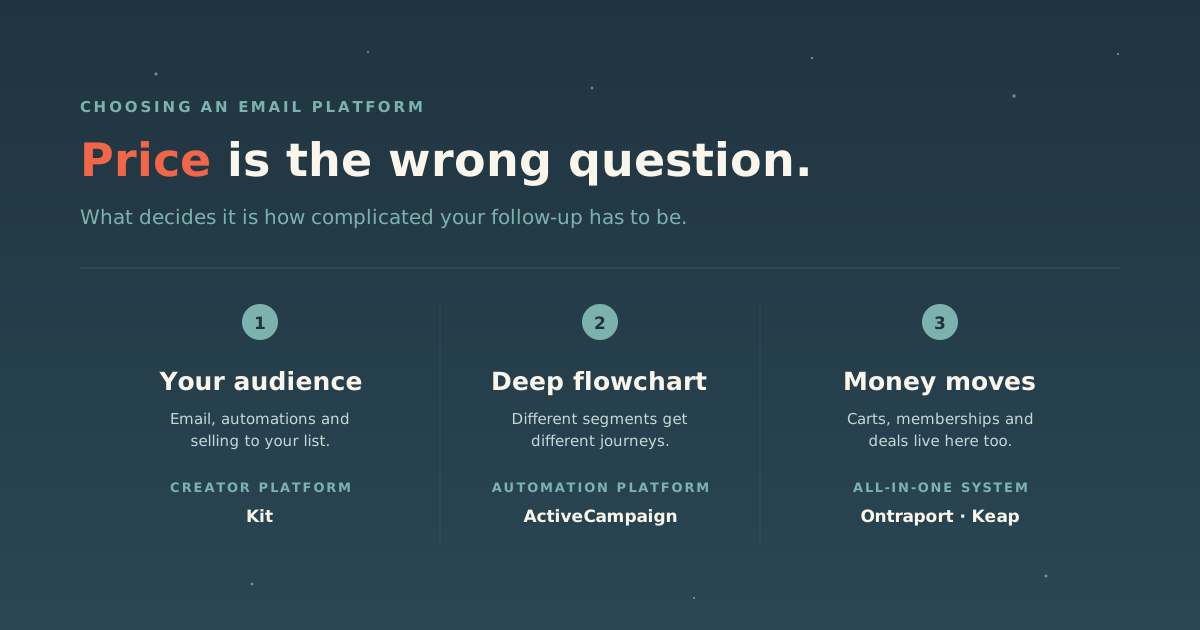
If your audience is the business, you publish, deliver lead magnets, run a welcome and nurture sequence, tag people by what they asked for, and sell to your list: digital products, a paid newsletter, a course. You want a creator platform. It will automate more than most people expect, without asking you to become an operations team.
If it takes a deeply branching flowchart, different segments get genuinely different journeys depending on what they bought, opened, clicked or ignored, with scoring and conditions stacked on top. That is an automation platform, and the learning curve is the price of admission.
If money moves through it, carts, membership access, and deal stages live on the same customer record as the email. That is an all-in-one, and the consolidation is worth real money when you use it and a waste when you do not.
Different right answers. Here is who each one is for.
| If your follow-up is… | You want | Our pick | Skip it if |
|---|---|---|---|
| Built around your audience | Creator platform | Kit | You need sales pipelines, lead scoring or deal stages |
| A deeply branching flowchart | Automation platform | ActiveCampaign | You send one broadcast a month |
| A business operating system | All-in-one | Ontraport or Keap | You only need email |
| A whole sales department | CRM-first | HubSpot | You are a solo operator |
Creator platform: Kit
Kit is where we point most coaches, writers, speakers and authors, and it does a great deal more than send newsletters. The interface is calm, the tagging stays understandable six months in, and you can send something today without a training session. It also scales. Kit’s homepage features authors and speakers like James Clear, Tim Ferriss, Susan Cain, Ryan Holiday, Arthur Brooks and Mark Manson, podcasters like Pat Flynn and Andrew Huberman, and names from well outside marketing, from Matthew McConaughey’s newsletter to Mandy Moore. Its customers run from people collecting their first hundred subscribers to some of the largest creator audiences online. That range is a real endorsement. The same tool holds up at both ends.
What it covers, beyond the broadcast:
- Automations and lead magnet delivery. Welcome sequences, nurture sequences, tag-based paths, and delivering the lead magnet someone signed up for. Kit’s automation is visual and readable. It is not as deep as ActiveCampaign’s branching logic, and it doesn’t try to be, but it handles the follow-up most creator businesses actually run. For keynote speaker and executive coach Jimmy Farris, we built an 18-month automated nurture sequence in Kit: every new subscriber gets a weekly email of his stories, frameworks and motivation, so he stays top of mind with future buyers long after they first opt in, without writing a new broadcast each week.
- Selling digital products. Ebooks, templates, presets and subscriptions sell directly from Kit, with product pages and automated fulfillment built in, so a first product doesn’t need a second platform. When you outgrow that, Kit connects to storefronts like Shopify and course platforms like Thinkific.
- Paid newsletters. Kit lets you turn a newsletter into recurring revenue with paid subscriptions, the model Substack made famous, while keeping your list on a platform you control.
- Growth through other newsletters. The Creator Network lets newsletters recommend each other so subscribers move between them. No other tool in this category has made list growth a native feature. It works when your audience overlaps with other people who publish regularly, and does very little in a niche where nobody else runs a newsletter.
The free plan deserves a specific note because it is unusually generous and unusually misread. As of September 2026, Kit’s free tier holds up to 10,000 subscribers, with unlimited broadcasts, forms and landing pages. That is far more headroom than the category norm. But the free tier has no automated sequences and no visual automations. Those start at the Creator plan, which ran a few dozen dollars a month at 1,000 subscribers, with Pro at roughly double that (ballparks; prices are subject to change).
Read that trade carefully, because the thing free withholds is the thing that runs while you are asleep. A welcome sequence that arrives the moment someone subscribes is the single automation we would build first for any client, and on the free plan you cannot build one at all. Free is an excellent way to start collecting addresses today. It is not a permanent home for a business that intends to follow up.
Where Kit stops is sales operations: pipelines, lead scoring and deal stages are CRM work, and it is deliberately not a CRM. When your follow-up becomes a flowchart with scoring and conditions on every branch, that is the point to look at ActiveCampaign, below.
Honest alternatives we earn nothing from: Buttondown is worth a look if you want something plainer still. Mailchimp remains the default most people reach for and has the widest integration support in the category. Neither is on our shelf, so treat this as a pointer to go and look rather than a review.
Automation platforms: ActiveCampaign
ActiveCampaign is for the point where your email plan stops being publishing and becomes operations. Different segments, conditional logic, lead scoring, triggers based on behavior rather than on the calendar. It is Kit’s nearest neighbor on this list: both automate, and the difference is depth. ActiveCampaign goes much further into branching logic and scoring, and asks more of you to run it.
We should be straight about our basis here, because it differs from the rest of this list. We do not run ActiveCampaign day to day. We know it from evaluation work: speccing it for clients with lists in the hundreds of thousands, sitting with their enterprise team, and pressing hard on deliverability before recommending it to someone whose list is the business. Narrower than daily use, and it is exactly the homework that matters when you are deciding whether to scale onto something.
It holds up. The platform does not start creaking where a lot of tools do.
The mistake to avoid is buying it for a small list and then only sending a monthly newsletter. It is overkill for a small list, not for a small business. A two-person firm selling a high-value service with a long sales cycle gets real value from behavior-triggered follow-up even with a modest list. The deciding question is not headcount. It is whether anyone is actually going to build the automations.
All-in-one: Ontraport and Keap
These solve the same problem. Automation, CRM and payments in one system, for businesses where money moves through the platform.
Ontraport is the one we know best and go back furthest with. We were building on it when it was still Office Autopilot, went through their first certification program, and became partners: they sent clients our way and we built the automations and membership sites. The clearest thing we can point at is Soil Food Web School, whose list grew from under 3,000 to more than 400,000 while running on it.
Its automation builder is genuinely the best part, and it is not close. Branching logic stays legible there in a way it rarely does elsewhere. The honest caveat is the all-in-one trade: each module is capable, few are best-in-class, and the order forms and sales pages have always felt plain next to a dedicated page builder.
Keap is the renamed Infusionsoft, and we go back to the original too. For years it was what our largest clients ran on, and it is the platform we learned complex automation on. Shortlist it if launches and deep automation are central to how you sell. Skip it if they are not, because the price and the interface both carry a lot of history.
For either one, the test is the same: does money move through the platform? If it does, the consolidation removes a whole category of integration problems. If it does not, you are buying a business operating system to send newsletters.
When it is really a CRM you need
HubSpot reaches further than anything above, with sales, marketing and service on one customer record and reporting across the entire journey. That reporting is the strongest argument for it, and it is hard to assemble yourself out of four tools that each know a fragment.
Two honest cautions. First, our basis is thinner here than elsewhere on this list: HubSpot is the one tool on our shelf we do not build often, so what we have is the view from alongside it, from clients running it and telling us what it costs. We would rather say that than imply otherwise.
Second, the test for HubSpot is whether you have a sales team, not how ambitious you are. Below roughly ten people with real handoffs between marketing and sales, most of what you pay for goes unused. Growing into it later is straightforward. Growing into it early is just expensive.
Can AI run it? Two grades for each platform
“AI features” now means two different things, and they deserve separate grades.
- Your AI: can an assistant you already use (Claude, including Claude Cowork, or ChatGPT) connect to the account and build things for you, not just write copy for you to paste? This usually runs through an MCP server, the connector standard that lets an assistant act inside your account.
- Built-in AI: can the platform’s own AI, inside the app, build automations and campaigns from a plain-language request?
A means it builds automations and campaigns end to end. B means real building or write access, but not the whole job. C means drafts, triggers or limited access only. D means AI writing help and little else. Where we have tested a platform ourselves, that result outranks its documentation, because the documentation often lags the product.
| Platform | Your AI | Built-in AI | What we found, as of September 2026 |
|---|---|---|---|
| Kit | A | Not graded | In our own work, Claude Cowork built a complete Visual Automation in Kit: it wrote the emails, built the automation, and created the tags and custom fields. Kit’s developer docs undersell this, so trust the result over the docs. We couldn’t assess Kit’s in-app AI. |
| HubSpot | B | A- | Its official MCP writes CRM records, lists, campaigns, email drafts and pages, but its documentation lists no workflow-building or sending tools. HubSpot’s own Breeze Assistant builds workflows from a prompt on Professional and Enterprise plans, leaving them switched off for you to review. |
| ActiveCampaign | C+ | B+ | The official MCP’s published tool list covers contacts, tags, lists, deals, editing an existing campaign, and adding a contact to an existing automation, but not creating campaigns or automations. Inside the app, Active Intelligence is where ActiveCampaign is putting its weight: an AI automation builder, an AI campaign builder and custom agents, with some features still in early access. |
| Ontraport | B- | D | The official MCP writes contacts, deals and custom objects, enrolls people in automations and handles invoices and payments. Automations, emails and pages are read-only to it. In the app, AI runs as a step inside automations rather than building them. |
| Mailchimp | C | C | The official connector plans and designs campaigns and saves them as drafts. In the app, AI analytics is live and an AI segment builder is in beta. Mailchimp describes AI that builds campaigns for you as coming soon. |
| Keap | C | D | An official MCP endpoint exists but its documentation wasn’t readable to us, and Keap’s API has no way to create automations or broadcasts. Its in-app AI writes campaign copy. |
| Buttondown | C- | D | No official connector, only community-built ones on a strong public API. In-app AI is minimal by design. |
Two honest caveats. First, this moves monthly, and documentation trails what the products can actually do, as Kit showed us. Second, an assistant that can operate a browser, as Claude Cowork can, may get further in any of these platforms than its connector alone suggests. Grades here reflect what we could verify or test. If you’re choosing a platform partly on this, test your own real task before you commit.
What you are actually paying for
The pricing axis matters more than the price, because it decides how your bill behaves as you grow.
- Billed on contacts. Kit and ActiveCampaign both scale on subscriber or contact count. You pay for everyone on the list, including people who have not opened anything since 2023. ActiveCampaign expresses send limits as a multiple of your contact count, listed at 10x and 12x depending on tier.
- Billed on modules and seats. The all-in-ones and HubSpot add axes. You buy hubs, then seats within them, then contacts on top, and the bill grows along all three at once.
The practical consequence is the same everywhere: an uncleaned list is a monthly invoice for people who are not listening. Pruning genuinely dead contacts is the cheapest optimization available in this category, and it improves deliverability at the same time, because sending repeatedly to addresses that never open weakens the engagement signals mailbox providers use to decide where your mail lands. There is more on that trade in how to grow your email list, including why net growth matters more than the headline subscriber count.
One more note on free plans. ActiveCampaign has no permanent free tier, only a 14-day trial. Kit has a real free plan, with the ceiling described above. A free plan is a good way to start and a bad way to choose, because the limits you will hit are rarely the ones advertised on the page.
Nonprofits: ask before you buy
Nonprofit pricing in this category is real and routinely left on the table, mostly because the discount has to be requested rather than applied at checkout.
- Mailchimp publishes 15% off paid plans for verified nonprofits. Request it before you purchase, because Mailchimp states it cannot provide retroactive discounts or refunds on past purchases.
- Constant Contact runs a prepay discount rather than a standing rate: 20% for prepaying six months and 30% for prepaying twelve, with no discount on monthly billing. US organizations submit a Federal Letter of Determination.
That last one is worth reading twice, because “up to 30% off for nonprofits” in a roundup usually means “30% if you hand over a year upfront.” For an organization managing cash tightly, that is a meaningfully different offer.
Terms in this category change, so confirm the current ones with the vendor before you commit.
The part the platform does not decide
Whichever tool you pick, the platform is not what determines whether your mail lands. Authentication, list hygiene and complaint rates do, and the mailbox providers enforce all three regardless of who you send through. Authenticating your sending domain with SPF, DKIM and DMARC is setup work that sits with you rather than with the vendor, and no platform can compensate if you skip it. The specifics, including Gmail’s bulk sender requirements and what CAN-SPAM requires of every commercial email you send, are in how to grow your email list.
Deliverability is never only the platform’s doing. Your sending habits and list hygiene carry more of it than most people expect, which is why we press on it during evaluation work before recommending anything to someone whose list is the business. No platform on this page can rescue a list assembled badly. The tool is a multiplier on the habits you bring to it.
Where to start this week
- Say your email plan out loud. Built around your audience, a deeply branching flowchart, or a business operating system.
- Pick from that answer, not from a feature grid.
- Check whether you qualify for a nonprofit discount, and request it before you subscribe.
- Export your list and count how many contacts have not opened anything in a year. That number is your monthly waste and your deliverability problem in one.
- Build the welcome sequence before you build anything else. It is the automation with the highest return and the one most often left for later.
If the follow-up itself is the part you are stuck on rather than the software, that is workflow automation work, and it looks the same whichever platform you landed on. If the path from subscriber to client is what needs building, that is a sales funnel.
Our full Email and CRM shelf has the longer review of each tool here, including where each one stops. We earn a commission on some of those links and say so on every page. The alternatives named above without links are ones we do not.
Sources: Kit pricing · Kit MCP docs · HubSpot remote MCP server · HubSpot MCP general availability · Ontraport MCP server · ActiveCampaign MCP tools · Mailchimp connector for Claude · Keap developer forum on the Keap MCP · Buttondown docs · Kit homepage (featured creators) · ActiveCampaign pricing · Mailchimp: About the Nonprofit Discount · Constant Contact: Nonprofit prepay discount information
Vendor pricing and discount terms were checked on 24 September 2026 and change often. Confirm current figures with the vendor before you buy.